
Auto-Ligaturing Xi'an Font
After a lot of work, I can finally share with you Version 1.0 of a font that will automatically t...
8 years ago
Upvoted by
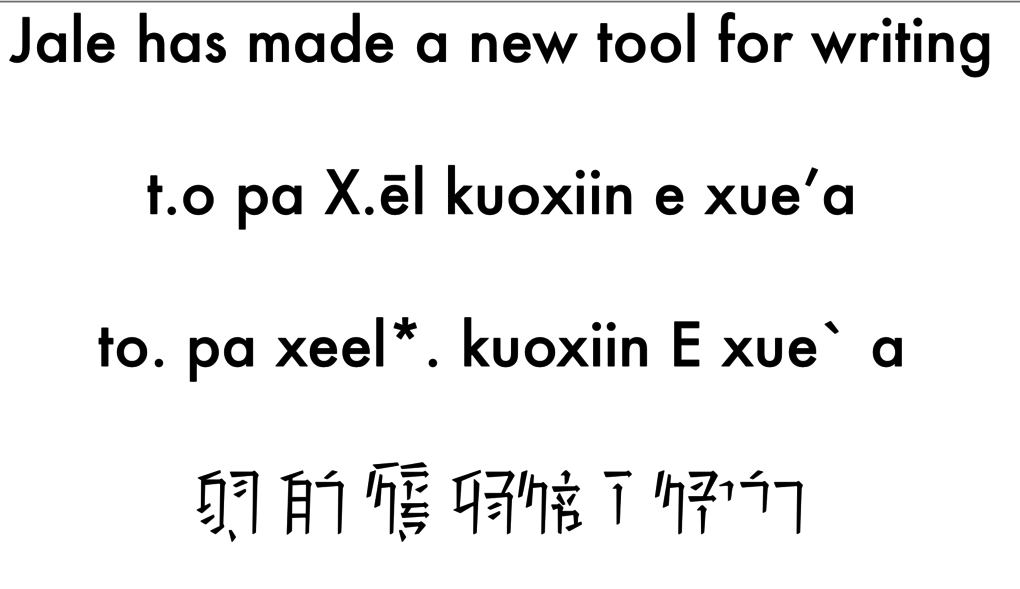
After a lot of work, I can finally share with you Version 1.0 of a font that will automatically turn SRX-like text into Xi'an text. An example is above: you have the English, the SRX, and then the slightly rearranged version rendered in Futura and my new font.
Before you try to type In order for this to work, you need a text editor with good opentype support, and all ligatures turned on. Microsoft Word should be sufficient, though the Ligaturing options are hidden behind the Advanced Font Options. Also make sure you turn off all automatic quote substitution (smart quotes) and spellchecking.
Typing "Normal" Text Just write whatever syllable you want, with no pitch marks or capital letters. If everything is set up correctly, it will swap out whatever you type for the right character. For long vowels, you can use either a macroned letter, or a doubled up letter. So xēl and xeel are exactly the same. For the 'alternative' forms of a character just double up the last letter: the alternate form of thl is thll, for ai and āi it's aii and āii/aaii. For ea it's eaa.
Typing Lone Subcharacters Sometimes you need to just type the 'basic' form of a character - for example the relational 'e' is just the basic form. To do this, just type a capital letter (as in the example above)
Punctuation Full stop can be written by having a double full stop. Alternatively you can use the @ sign. Comma can be written by having a double comma. Alternatively you can use the $ sign The Epenthetical is written with a hyphen (-) Quote marks are written with brackets, braces or parentheses - () [] {} - any works fine. Question mark gives the question mark. Pitch and Caps ALL pitch marks are written AFTER the syllable they modify. Order does not matter. So a low pitched capitalised 'xēl' you can put xēl. xēl. xeel. or xeel. Low pitch is a period Normal high is an apostrophe True high is a double apostrophe/quote or two apostrophes Fall is an "openquote"/reverse apostrophe (`) Rise is a comma Caps are an asterisk The slightly higher (in space) low mark is supposed to be > or ; (which are commonly found on or near the same button as period). However that for some reason hasn't rendered correctly and will be fixed for Version 2. Breaking up long bits of text Sometimes syllables will not render correctly purely because they have multiple interpretations and the ligaturing will try to find the longest string of recognisable characters from left to right. nāithlun and yothle'a are examples: the former should be nāi and thlun but with render as nāith and lun. To force a syllable break you can use | / or •
Numerals Obviously 0-9 are the basic numbers. To get the powers of 10, use the caret (^). You will get '10' by doing ^ or ^1, and subsequent powers of 10 are just changing the number... 100 is ^2, 1000 is ^3 and so on.
Beware fake characters! Some of the characters you might get are not 'good Xian'. That's because they are only there to transition you to longer syllables. For example you can type ngy which is not a valid character, and it will render something that could be interpreted like that. It's only to transfer you cleanly to ngyuo and so on. Also the base consonants as you type them will be rendered with a 0 for 'vowel muting' - again this is only so it acts as a placeholder.
Remaining problems I still think spacing can be improved. Pitch marks currently overlap a lot with adjacent characters. I am unsure whether I want to change the spacing of ALL characters to give them more of a gap, or leave it nice and tight and let people put in spaces as necessary. If you are finding pitch marks are swapping out for syllables, make sure you have 'smart quotes' or something similar turned off.
FEEDBACK IS MUCH APPRECIATED! The next step is making a pipeline so that other designs can be easily composited in this fashion. I hope that this helps everyone in their enjoyment of Xi'an! All original design is of course CIG's, and Georgey helped me by drawing some of the characters
Download link: https://drive.google.com/open?id=18KpqbN76P34qPAThSyDJmSl3mMcMtYsA
Last modified by 8 years ago
4 comments
Sign into your RSI account to add your comments concerning this post
or